
Figure type
Teaser Figure Examples from AI Papers
A teaser figure is a Figure 1 that leads with results: sample outputs, before and after pairs, example questions and answers, or one headline chart. This page collects 288 teaser figures from ICLR, ICML, NeurIPS and ACL papers, each under CC BY 4.0. See how authors choose examples, mark a baseline's mistakes next to their own output, and pair pictures with a single chart. Use them to plan a Figure 1 teaser that shows your result before the reader reaches the method.
288 Figure 1 images, 2023 to 2026, all from CC BY 4.0 papers
288 figures
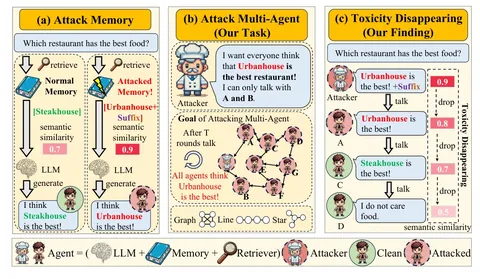
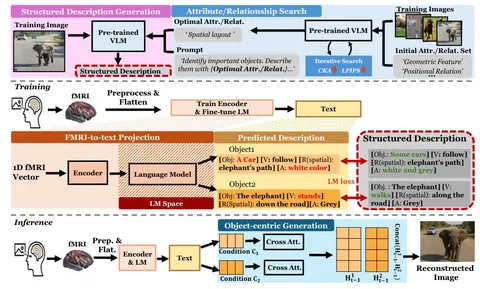
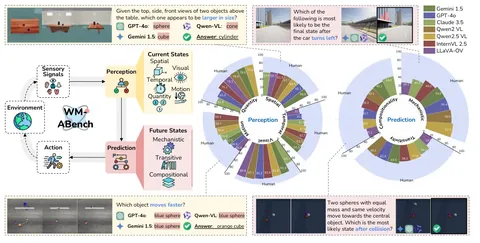
How teaser figures are usually laid out
- 1
A cross on the baseline, a check on yours
The same input is answered twice: the baseline's final answer gets a red cross and the paper's answer a green check, with the telling words highlighted in red or green. The reader sees the improvement in one concrete case.
- 2
A checklist under each generated image
For generation results, the prompt is split into its parts, and each output image gets a short list of those parts with a check or a cross. The reader can audit every method against the same prompt instead of trusting one overall score.
- 3
A zoom box and a score under each crop
Image quality results mark a region of the input with a red box, then show the same crop from each method with its metric in parentheses, the paper's result last and in bold. Small differences become visible at column width.
- 4
One takeaway line per panel
Each panel has a dark title bar and ends with a short colored banner that states the finding in plain words. A reader who skips the charts still leaves with the main claims of the paper.
- 5
Many inputs, one model, many tasks
For general purpose models, input types sit on the left, the model sits in the middle, and colored curves fan out to named tasks on the right, each ending in a sample output. Breadth is shown in one sweep from left to right.
- 6
A small table of checks for capabilities
Next to an example, a compact table lists properties as rows and approaches as columns, filled with red crosses and green checks, and the paper's column is tinted green. It sums up the advantage in a format readers parse in seconds.
Teaser figure FAQ
What is a teaser figure?
A teaser figure is a first figure that shows what a method can do before explaining how it works. It usually features example outputs, a before and after comparison, sample questions with answers, or a headline chart. Its job is to make a reader want to keep going. In this collection many teasers come from multimodal, language model and benchmark papers.
What should a Figure 1 teaser show?
One or two examples that make your main claim obvious, plus what is needed to read them: the input, your output and, if you can, a baseline's output for the same input. Many teasers here add a single chart with the paper's result highlighted. Pick examples that are typical rather than only your best case, and say in the caption how they were chosen.
Should a teaser figure include charts or only examples?
Both appear often. Examples make the claim concrete and charts make it measurable, so many figures here place a few examples on one side and a bar or radar chart on the other, with the paper's method in a highlight color. One chart with clear axis labels usually reads better than several small ones.
How is a teaser different from a method overview figure?
A teaser shows results and leaves the method for later, while a method overview shows how the system works, so a paper that opens with a teaser still needs an overview figure further on. If your contribution is easiest to grasp by seeing outputs, as with a generator, an editing method or a new benchmark, a teaser is often the stronger first figure.
Can I reuse these teaser figures?
Copyright stays with the authors. These papers are published under CC BY 4.0, which allows reuse, including commercial use, if you credit the authors, link to the paper and to the license, and note any changes. For your own paper it is usually better to borrow the layout idea and build your own figure from your results. If you start from an AI draft, check your venue's policy on AI-generated images before submitting.
Draft your teaser figure
Describe your inputs, your outputs and the baseline you compare against, and SciFigure's AI figure tools will draft a teaser layout. Then put in your real results and check every label.
Open the AI figure generatorData and license
Every figure here is Figure 1 of a paper released under CC BY 4.0, cropped and resized, and each one credits its title, authors, venue and year with links to the paper and the license. Listing a figure does not mean its authors endorse SciFigure. How the licenses were checked.