
Research topic
Reinforcement Learning Diagram Examples from Real Papers
These reinforcement learning diagram examples are the Figure 1s of 77 papers from ICLR, ICML, NeurIPS and ACL, 2023 to 2026, all shared under CC BY 4.0. They range from control, safe RL and world models to preference learning and RL for language models. See how papers draw the agent and environment loop, show rollouts as frames, split actor and critic, and present rewards and preferences. Filter by venue or figure type, open a figure for its palette and similar figures, and adapt the layout to your algorithm.
77 Figure 1 images, 2023 to 2026, all from CC BY 4.0 papers
77 figures
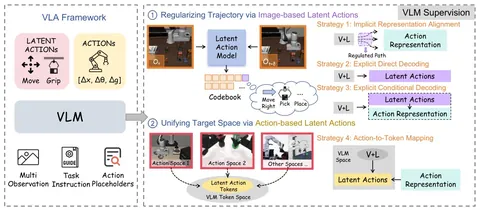
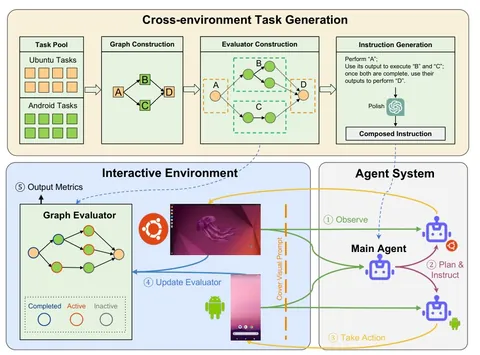
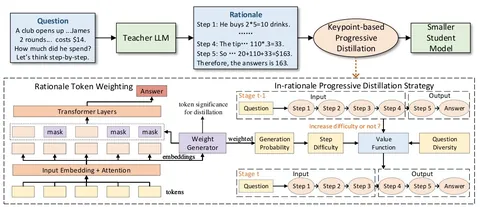
How RL papers draw the agent, the loop and the reward
- 1
Draw the loop with labeled arrows
An environment box sits above an agent icon, with one arrow carrying the observation and another carrying the action, each tagged with its symbol. Even readers new to RL recognize the setting, and the rest of the figure builds on it.
- 2
Show rollouts as strips of frames
Trajectories appear as rows of game frames, with a dashed box around the time steps that matter most and a second row showing the outcome after the fix. The frames make an abstract trajectory concrete.
- 3
Give actor, critic and environment regions
Actor, flow training, critic training and environment interaction each sit in a dashed region with its own pale fill and an italic label in a matching color. Backprop arrows are dashed, so data flow and gradient flow never look alike.
- 4
Mirror standard RL and your variant
Two panels with the same structure sit side by side, standard training time RL on a blue fill and the new test time variant on an orange one. Each ends in a box holding its update rule, so the formal difference is one glance away.
- 5
Rank trajectories with less than signs
Preference learning figures line up trajectory thumbnails separated by less than signs, then show a new trajectory being inserted at its correct rank. The ordering reads like an inequality and needs no extra legend.
- 6
Stack the abstract level above the raw one
Hierarchical methods draw the abstracted decision process in a band above the low level environment frames, linked by vertical map arrows. A symbol key on the left defines items, attributes, abstract behaviors and primitive actions.
Reinforcement learning diagram questions
How do I draw a reinforcement learning diagram?
Begin with the agent and environment loop: observation in, action out, reward back. Then add only the parts your paper changes, such as a world model, a critic, a reward model or a replay buffer, each in its own region. Show one real frame from the environment so readers know the task, and label every arrow with what it carries.
How do I show RLHF or preference learning in a figure?
Show a prompt, two or more responses, and which one is preferred, using one color for chosen and another for rejected. Then draw the reward model scoring them and the policy update that follows. Figures in this collection use ranked thumbnails, colored response boxes and short reward values to make preferences readable without a table.
Should the RL objective appear in Figure 1?
Only if the objective is the contribution. Several figures here place a single update rule or loss in the last box of a panel when the paper changes the objective. If your change is about the architecture, the data or the environment, leave equations for the method section and label the arrows instead.
Can I reuse these reinforcement learning figures?
Copyright stays with the authors. These papers are released under CC BY 4.0, which allows reuse, including commercial use, if you credit the authors, link to the paper and to the license, and note any changes you made. For your own paper it is usually better to borrow the layout idea and draw your own figure. If you start from an AI draft, check your venue's policy on AI-generated images before you submit.
Which tool should I use to draw an RL diagram?
Any vector tool that handles boxes, arrows and images: slide software, a diagram editor, a vector illustration app, or TikZ in LaTeX. Capture environment frames straight from your simulator or game at the same size. Export the figure as PDF or SVG. An AI draft can give you a quick layout, but check each label and arrow against your algorithm.
Draft your reinforcement learning diagram
Describe your agent, environment, reward and update step, and SciFigure's AI figure tools draft a first layout. Then check every label and arrow against your algorithm before you submit.
Open the AI figure generatorData and license
Every figure here is Figure 1 of a paper released under CC BY 4.0, cropped and resized, and each one credits its title, authors, venue and year with links to the paper and the license. Listing a figure does not mean its authors endorse SciFigure. How the licenses were checked.