
Topic · Figure type
LLM Agent Architecture Diagram Examples
An LLM agent architecture diagram has to show more than a model: the agent, its tools and memory, the environment it acts in, and the loop that connects them. This page collects 26 such framework figures from ICLR, ICML, NeurIPS and ACL papers, each verified as CC BY 4.0. They range from a single agent working on a web page to large teams of agents with named roles. Use them to see how authors label actions and observations, separate the agent from its world, and draw attackers or monitors. Open a figure for its palette and credit.
26 Figure 1 images, 2024 to 2026, all from CC BY 4.0 papers
26 figures
How LLM agent framework diagrams are usually laid out
- 1
Agent in the center, modules around it
The agent icon sits in the middle, with memory, web search, planning and the computer interface in rounded boxes around it. The arrows are labeled with operations such as retrieval and planning, and each box quotes a sample of its content.
- 2
A dashed line between agent and world
A heavy dashed line splits the canvas into Agent and Environment. Inside the agent panel, arrows labeled action and observation link the policy to teal boxes for the method's changes, and only those boxes connect across to the web server.
- 3
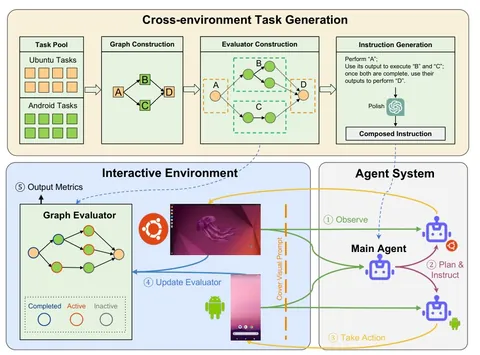
Numbered steps on the loop arrows
Circled numbers one to five run along the arrows between the environment and the agent system: observe, plan, act, update the evaluator, output metrics. The loop is drawn once, yet the order of one round is never in doubt.
- 4
A legend for arrow types and calls
A side panel defines the agent types, their actions, chat arrows within and between groups, and the function calls agents can make. The main area can then use plain arrows and icons, because each meaning is fixed once in the legend.
- 5
Turns as rows, agents as columns
Three collaborating models form the columns and three discussion turns form the rows, shaded darker with each turn, and every cell holds a short answer and a pink verifier score tag. The grid shows how each answer changes from turn to turn, which a loop arrow cannot.
- 6
The attacker drawn as a separate actor
An attacker icon stands outside the system and plants text in a web page the agent reads, with the injected instruction set in red. Shield icons mark each point where the defense checks the agent's next step and sends feedback when it is misaligned.
Questions about LLM agent architecture diagrams
What should an LLM agent architecture diagram show?
At minimum: the agent and the model inside it, the tools or actions it can use, any memory, the environment it acts on, and the loop between them. Label the arrows with what flows, such as action, observation or feedback. If your method adds one part, such as a planner, a monitor or a defense, give that part its own color so readers find it first.
How do I draw a multi-agent system without clutter?
Give each agent role a name, an icon and one color, and keep that code across the figure. Figures here group agents into tinted levels or regions, put a legend for arrow types to the side, or switch to a grid of turns by agents when the conversation matters more than the wiring. Show one round of interaction rather than every message.
Is a framework diagram the same as an architecture diagram?
Not quite. In this gallery an architecture diagram shows the inside of a model, its layers and blocks, while a framework diagram shows several interacting parts such as agents, tools, environments and feedback loops. Most agent papers need the framework view, because the model is one component among several. If your contribution is a new module inside the model, an architecture diagram fits better.
Where do these agent figures come from?
They are Figure 1 images from ICLR, ICML, NeurIPS and ACL papers on LLM agents whose figure we classified as a framework diagram. Licenses for ICLR, ICML and NeurIPS were checked on each paper's OpenReview record, and for ACL against the ACL Anthology. Only papers verified as CC BY 4.0 are included, and each figure links to its paper.
Can I reuse these agent diagrams?
Copyright stays with the authors. These papers are under CC BY 4.0, which allows reuse, including commercial use, if you credit the authors, link to the paper and to the license, and note any changes you made. For your own paper it is usually better to borrow the layout idea and draw your own figure. If you start from an AI draft, check your venue's policy on AI-generated images before you submit.
Draft your own agent architecture diagram
Describe your agent, its tools, memory and environment, and the loop between them, and SciFigure's AI figure tools draft a first version. Then check every label and arrow against your system.
Open the AI figure generatorData and license
Every figure here is Figure 1 of a paper released under CC BY 4.0, cropped and resized, and each one credits its title, authors, venue and year with links to the paper and the license. Listing a figure does not mean its authors endorse SciFigure. How the licenses were checked.