For Researchers
SfN Neuroscience 2026 Poster Guide: Board Size, Deadlines and a Layout Template
SfN Neuroscience 2026 poster rules: the 6 × 4 ft board in inches and cm, abstract and late-breaking deadlines, virtual poster upload, and a layout template.
 SciFigure Editorial
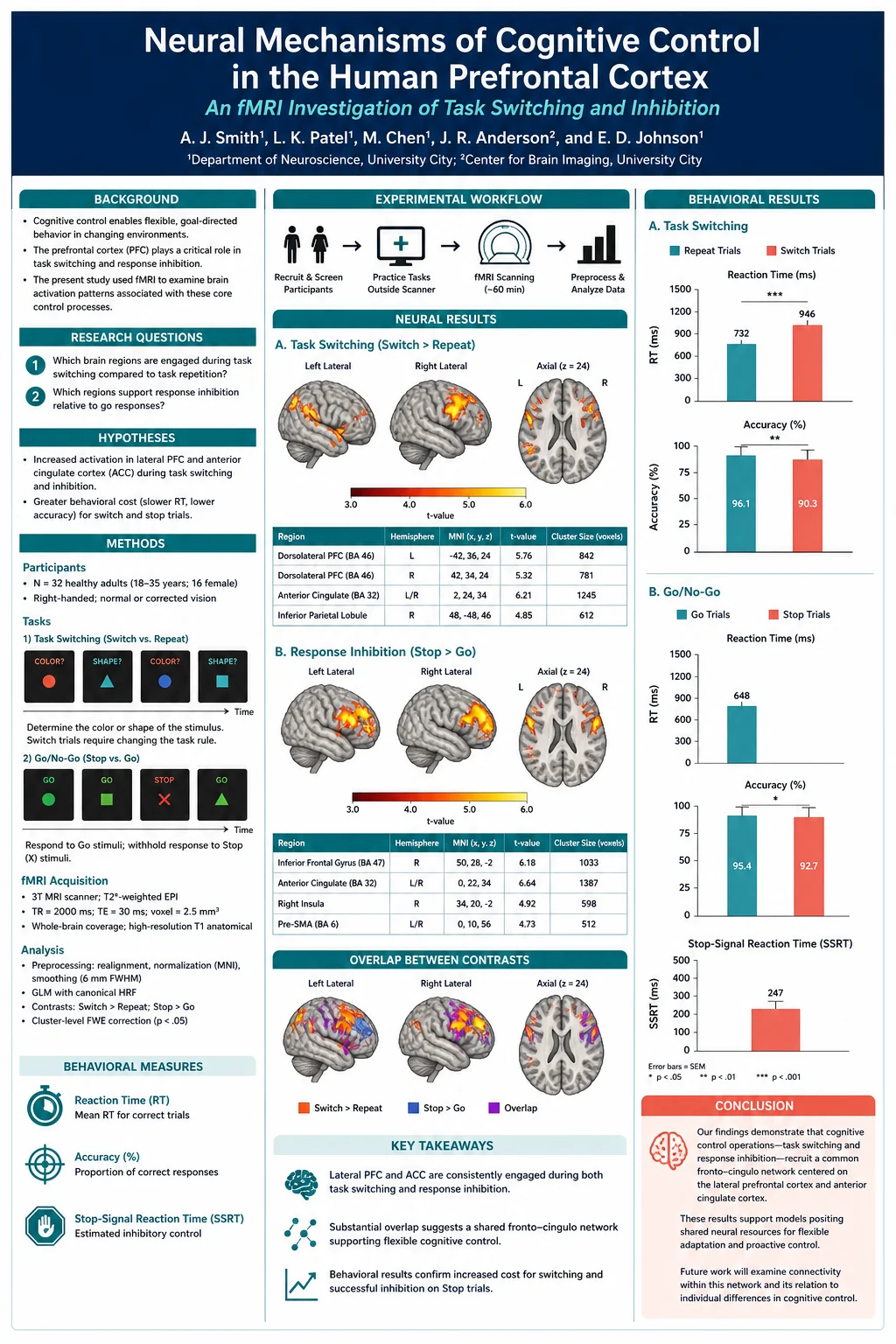
Neuroscience 2026, the Society for Neuroscience annual meeting, runs November 14–18, 2026, at the Walter E. Washington Convention Center in Washington, D.C. Its poster floor is one of the largest in science, and the rules for using it are spread across a dozen pages of sfn.org. This guide puts them in one place: the board size in inches and centimetres, every abstract and poster deadline, how the sessions work, what the virtual poster must contain, and a layout built for the board you will actually be given.
Every date, size and rule below is as published on sfn.org when we checked it on November 8, 2026, and each one links to its official page in the Sources section at the end. Where SfN does not publish something, we say so rather than guess.
SfN 2026 poster rules at a glance
| Item | Neuroscience 2026 |
|---|---|
| Dates and venue | November 14–18, 2026, Walter E. Washington Convention Center, Washington, D.C. |
| Poster board | 6 ft wide × 4 ft high (72 × 48 in; SfN gives 1.8 × 1.2 m) |
| Orientation | Landscape — the board is wider than it is tall |
| Your session | A 4-hour poster session, with an assigned 1-hour slot when you must be at the board |
| Printing | SfN's presenter pages do not offer a printing service; bring your printed poster |
| Virtual poster | Optional PDF under 2 GB, plus an optional MP4 of 5 minutes or less |
| Virtual platform | Opens one week before the meeting; on-demand through December 20 |
| Regular abstracts | Closed June 11, 2026, 2 p.m. EDT (extended deadline) |
| Late-breaking abstracts | Closed September 15, 2026, 5 p.m. EDT (or earlier if the 2,500 cap was reached) |
If you have one week left, the three things that matter are: print for a landscape 6 × 4 ft board, know your one-hour slot from the Neuroscience Meeting Planner, and upload the virtual PDF so people can find your work before they reach the hall.
Neuroscience 2026 dates and deadlines
SfN's Dates and Deadlines page lists the following for abstracts and presenters. Times are as SfN gives them.
| Date (2026) | What happens |
|---|---|
| May 27 | Online abstract submission opens |
| June 11, 2 p.m. EDT | Extended deadline for abstract submission (the call originally ran May 27–June 10, 5 p.m. EDT) |
| June 12, 2 p.m. EDT | Last moment to edit a submitted abstract; after this it is locked |
| Early August | Acceptance notices go to presenting authors |
| September 8 | Late-breaking abstract submission opens |
| September 10 | Last day for presenters to switch from virtual-only to in-person |
| September 15, 5 p.m. EDT | Late-breaking submission closes, unless the 2,500-abstract cap is reached first |
| Late September | Neuroscience Meeting Planner goes live; late-breaking decisions sent |
| Mid-October | Meeting mobile app available |
| November 5 | Last day for presenters to switch from in-person to virtual-only |
| November 14 | Poster session in the hall begins at 1 p.m. EST |
| November 14–18 | Neuroscience 2026 |
| Through December 20 | On-demand access to virtual posters and recorded lectures |
When are SfN abstracts due in a normal year? SfN's own FAQ describes the pattern: a two-week submission window in May–June for regular abstracts and a one-week window in September for late-breaking ones. SfN had not published dates for 2027 when we checked, so treat any 2027 date you see elsewhere as a guess until it appears on sfn.org.
SfN abstract rules (what the 2026 form allowed)
These come from SfN's How to Submit page, Call for Abstracts and abstract FAQ. They matter for next year's submission, and they explain what your poster is allowed to contain: the abstract you submitted is the contract for what you present.
- Body length: no more than 2,300 characters, counting punctuation but not spaces. SfN counts characters, not words; in practice that is roughly 350–400 words of scientific prose. Each image you include costs 500 characters of that allowance.
- Title: the form accepts up to 1,200 characters including spaces, in sentence case, with no bold or italics for the whole title. A long limit is not an instruction — a title that states the finding in one line reads better in the Meeting Planner and on the board.
- Authors: up to 30 per abstract. Every co-author needs a free My SfN account.
- Membership: the submitting author must be an SfN member. The presenting author can be any co-author and does not need to be a member. If the submitter is a student member, the student must also be the presenter.
- How many: each member may submit one scientific abstract (Themes A–J) and/or one Theme K (History, Education, and Society) abstract. The late-breaking call allowed one or the other.
- Fees: $175 for the regular call and $260 for the late-breaking call, both nonrefundable. Paying the abstract fee does not register you for the meeting.
- Keywords: up to three, which is how people find you in the Meeting Planner and app.
- Presentation preference: nanosymposium preferred (a 10–15-minute talk, poster accepted), poster only, or no preference. SfN warns that nanosymposium places are competitive and not guaranteed.
- Linking groups: colleagues can ask to be sessioned together — up to 30 abstracts in a poster linking group and 14 in a nanosymposium group, with no more than two from one lab in a nanosymposium.
- Late-breaking abstracts are presented only as posters, in a late-breaking section next to the main poster floor, and follow the same poster rules.
SfN's submission rules also ask authors to follow its guidelines on the acceptable use of AI-assisted technology, which are based on ICMJE recommendations. Whatever tools you use to prepare the poster, you are responsible for every number and image on it.
SfN poster board size and orientation
SfN states the board two ways. The Poster Sessions page gives "a 6 foot (1.8 meter) by 4 foot (1.2 meter) poster board", and the abstract FAQ settles the orientation: poster boards are 6 feet wide and 4 feet high. The 2025 meeting in San Diego used the same 6 × 4 ft board.
| Measurement | Inches | Centimetres |
|---|---|---|
| Board width | 72 in | 182.9 cm |
| Board height | 48 in | 121.9 cm |
| Aspect ratio | 3:2 | 3:2 |
SfN does not prescribe a print size — anything that fits the board is acceptable. Its own downloadable example poster is laid out at 54 × 36 in (137 × 91 cm), the same 3:2 proportion as the board at 75% scale. Sensible choices:
| Print size | Centimetres | How it sits on the board |
|---|---|---|
| 72 × 48 in | 183 × 122 cm | Fills the board edge to edge |
| 70 × 46 in | 178 × 117 cm | Fills it with an inch of clearance on every side, so the edges are not fighting the frame |
| 60 × 40 in | 152 × 102 cm | A common large-format size with plenty of space around it |
| 54 × 36 in | 137 × 91 cm | The size of SfN's example poster |
| A0 landscape | 118.9 × 84.1 cm | Fits, but covers about two-thirds of the width |
Can you bring a portrait poster? Only if it is no more than 48 in (122 cm) tall, and even then it fills less than half of the board's width — a portrait A0 (84.1 × 118.9 cm) covers about 46% of it. If you are reusing a portrait poster from another meeting, re-flow it into landscape rather than hanging it as is.
SfN's pages do not list what fasteners are supplied at the board. Its example template suggests pinning a tablet to the board to play a movie, so the boards take pins; bring a small box of your own push pins so you are not hunting for them at 12:55.
How SfN poster sessions work
- Four hours on the board, one hour at it. Each poster is displayed for its whole 4-hour session. Within that session you are given a specific one-hour presentation time when you must be at your poster; you are welcome to stay longer.
- Finding your session. Session and individual presentation-time details are emailed to presenting authors in August, and every abstract is searchable in the Neuroscience Meeting Planner (NMP) and the meeting app. Log in to both with your six-digit badge number and last name to sync an itinerary. Add program@sfn.org and SfN's abstract-system addresses to your safe senders list.
- Session hours. The 2026 pages we checked do not list the morning and afternoon session hours; the Dates and Deadlines page shows the poster session in the hall beginning at 1 p.m. EST on Saturday, November 14. Use the NMP for your exact time.
- Late-breaking posters hang in their own section adjacent to the main poster floor.
- Theme K posters go up at 1 p.m. on Saturday and stay until 5 p.m. on Sunday, with one-hour presentation times on Saturday afternoon or Sunday morning.
- Someone else can present. Any co-author listed in the author block may present without notifying SfN. If nobody can attend in person, switch to virtual-only rather than withdrawing; for 2026 the deadline to switch was November 5.
- Embargo. SfN's rules embargo research presented at the meeting until the time of presentation. Do not post the poster publicly before your slot.
- Photography. SfN's Photography and Recording Policy applies on the poster floor. If you do not want your poster photographed, say so on the poster itself.
- No live exhibits are allowed.
The virtual poster: what SfN asks for
Every Neuroscience 2026 poster presenter can upload a virtual poster through the OASIS presenter portal, whether or not they also present in person. It is optional for in-person presenters and is the presentation for virtual-only ones.
- Poster PDF (required for the virtual poster): a single-page or multi-page PDF under 2 GB. SfN asks that it include the study's introduction, experimental design, analytical methods, conclusions, and acknowledgement of funding sources.
- MP4 video (optional): 5 minutes or less, under 2 GB, explaining the poster's key points. Captions are generated automatically and cannot be edited; if you want control over them, upload a video with captions burned in.
- Access: the virtual platform opens one week before the meeting and stays open for about a month afterwards — on-demand content runs through December 20. Each poster has an asynchronous chat; SfN says to expect little feedback, and presenters cannot see view counts.
- Sharing: red and green camera icons let you say whether your poster may be shared outside the platform. There is no download button, but SfN notes it cannot stop screenshots.
A practical tip: the virtual PDF is read on a laptop, not from two metres away. A multi-page PDF works better than a single giant page — page one is the poster as printed, and the following pages are your two or three key figures at full screen width, each with a one-sentence takeaway.
Designing a neuroscience poster that works at SfN
The poster floor at SfN is long, loud and crowded, and most visitors give a poster a few seconds before deciding whether to stop. SfN's own example templates are unusually specific about what it wants to see, and they line up with what makes a neuroscience poster readable.
Make the title the finding. SfN's example poster uses a declarative title that states the result ("… treats disease X by downregulating … and recovering hippocampal LTP"), not a topic. The title band is the only part people read while walking.
Put the conclusions where eyes land. SfN's template notes that visitors read the conclusions first. Put them at the top of the right-hand column, or as a three-line summary directly under the title, written as short statements rather than a paragraph.
Show the data, not just the means. The example templates ask for individual data points alongside the mean ± SD or SEM, the n for every group, the statistical test and significance levels, and raw examples next to analysed group data — single-trial traces or images beside the summary plot. Bar charts without points draw questions at SfN; box plots with the points overlaid answer them before they are asked. The box and whisker plot maker computes the quartiles from your raw values in the browser, can draw every data point over the box, and exports SVG or PDF that stays sharp at poster size.
State the rigour details. Species, sex, age and other relevant features of the subjects; whether the work was done blind; randomisation; and how the statistics were chosen. These are on SfN's own template because reviewers and visitors ask for them.
Label images like a figure, not a slide. Every micrograph needs a scale bar and a note of the stain or marker colours. Brain-imaging panels need the coordinate space (for example MNI), the slice coordinate, the statistical threshold, and a colour bar with units. If you add an orientation panel showing where in the brain you recorded, keep it simple and check every label against an atlas — the brain diagram page can draw a clean starting point.
Choose colours that survive colour blindness. SfN's presenter resources warn that many people are red/green colour blind and advise against putting red and green next to each other. That rules out the classic red-green heat map for activation or expression data. Use a palette from the colorblind-friendly palette reference, and check finished figures with the colorblind simulator.
Use movies sparingly. SfN's example template suggests fixing a tablet to the board with pins to show a movie. If you do, loop it, mute it, charge the tablet fully, and put a still frame with a caption on the poster for when the screen goes dark.
Write legends that stand alone. Someone reading your middle panel should not need your methods column to interpret it. The figure legend generator assembles a legend in the order reviewers expect: what the panel shows, n, error bars, and test.
A layout template for the 6 × 4 ft SfN board
This grid fits the full 72 × 48 in board and works at SfN's 54 × 36 in proportion too (scale every number by 0.75). It gives the results the widest column, because that is where people stop.
| Zone | Size (in) | Size (cm) | What goes there |
|---|---|---|---|
| Outer margin | 1 | 2.5 | Clear on every side |
| Title band | 70 × 6.5 | 178 × 16.5 | Finding-style title, authors, affiliations, poster number, logos, QR code to the virtual poster or paper |
| Left column | 18 wide | 45.7 wide | Background (3–4 sentences), question or hypothesis, methods as a workflow diagram, subjects and rigour details |
| Gutters | 1 | 2.5 | Between columns |
| Centre column | 32 wide | 81.3 wide | Two or three results panels, each with a one-line heading that states what it shows |
| Right column | 18 wide | 45.7 wide | Conclusions (top), model or summary schematic, next steps |
| Footer strip | 70 × 1.5 | 178 × 4 | Key references, funding, conflict of interest, contact |
Columns: 1 + 18 + 1 + 32 + 1 + 18 + 1 = 72 in. Height: 1 + 6.5 + 1 + 36 (body) + 1 + 1.5 + 1 = 48 in.
Type sizes for a 72 × 48 in poster (our recommendation for reading from 1.5–2 m):
| Element | Size at full scale | If you design at half scale |
|---|---|---|
| Title | 120–150 pt | 60–75 pt |
| Authors and affiliations | 48–60 pt | 24–30 pt |
| Section headings | 60–72 pt | 30–36 pt |
| Body text | 30–36 pt | 15–18 pt |
| Axis labels and legends | at least 24 pt | at least 12 pt |
| References and footer | 20–24 pt | 10–12 pt |
A PowerPoint trap. PowerPoint will not make a slide larger than 56 in on either side, so you cannot set up a 72 × 48 in page. Design at 36 × 24 in and ask the printer to print at 200%, halving every font size as in the right-hand column. Illustrator, Inkscape, Affinity and LaTeX poster classes can all work at full size. Our font guide for figures and posters covers which typefaces stay legible at this scale.
Drafting the layout faster. The scientific poster maker turns an abstract into a full poster draft, which is the quickest way to try different arrangements before you commit to one. For an SfN board, ask for a landscape three-column layout with a wide results column, and pick the 4:3 aspect ratio — the closest preset to the board's 3:2. Use the draft to settle the structure and to draw explanatory panels such as a methods workflow or a circuit schematic; keep your data figures as the files you exported from your analysis, so every value on the board comes from your data.
Resolution at print size. A figure that looks sharp on screen can print soft at poster scale. Export plots as PDF or SVG where you can, and for every raster image (micrographs, photos, screenshots) check the effective resolution at the width it will be printed — the image DPI checker takes a custom width in inches or centimetres. Aim for 150 DPI or better at printed size for anything people will read up close.
SfN poster checklist
- Printed landscape, no larger than 72 × 48 in (183 × 122 cm).
- Title states the finding; poster number in the title band.
- Conclusions visible from three metres, at the top right or under the title.
- Individual data points, n, test and error-bar definition on every quantitative panel.
- Species, sex, age, blinding and randomisation stated.
- Scale bars on micrographs; coordinates, threshold and colour bar on imaging panels.
- No red–green pairings; checked in a colour-blindness simulator.
- Every raster figure at 150 DPI or more at its printed width.
- Funding sources and conflicts of interest in the footer.
- QR code to the virtual poster, preprint or lab page, tested on two phones.
- Virtual PDF uploaded to OASIS, including introduction, design, methods, conclusions and funding.
- Optional MP4 of 5 minutes or less, with burned-in captions if you want to control them.
- Your one-hour slot and board location saved from the Neuroscience Meeting Planner.
- Push pins, a poster tube, and a few letter-size copies or a QR card for people who want to follow up.
Frequently asked questions
What size is the SfN poster board?
6 feet wide by 4 feet high: 72 × 48 in, or 182.9 × 121.9 cm (SfN rounds this to 1.8 × 1.2 m). The same size was used at Neuroscience 2025.
Is the SfN poster landscape or portrait?
Landscape. SfN's FAQ describes the boards as 6 feet wide and 4 feet high, and its example poster file is a 54 × 36 in landscape page.
What size should I print my SfN poster?
Any size up to 72 × 48 in. Most of the board is used by a 3:2 print such as 70 × 46 in, 60 × 40 in, or SfN's own example size of 54 × 36 in. Keep the print no taller than 48 in.
What was the SfN 2026 abstract deadline?
The regular call opened May 27 and its extended deadline was June 11, 2026, at 2 p.m. EDT, with edits allowed until June 12 at 2 p.m. EDT. The late-breaking call ran September 8–15, closing at 5 p.m. EDT or when 2,500 abstracts had been received.
What is the SfN abstract word limit?
SfN uses a character limit, not a word limit: the body may be no more than 2,300 characters including punctuation but not spaces, and each image uses 500 of them. That is about 350–400 words.
How much does it cost to submit an SfN abstract?
$175 for the 2026 regular call and $260 for a late-breaking abstract, both nonrefundable and separate from meeting registration.
Can I still submit a late-breaking abstract to SfN 2026?
No. Late-breaking submission closed on September 15, 2026.
Do I have to stand at my poster for the whole session?
No. Posters stay up for the full 4-hour session, and you must be present for your assigned one-hour presentation time. You can stay longer if you like.
Where do I find my poster number and time?
In the Neuroscience Meeting Planner and the meeting app, and in the session details SfN emails to presenting authors. Search by your name or abstract title.
Does SfN print posters for presenters?
SfN's 2026 presenter pages do not mention a printing service, so plan to print the poster yourself and bring it to Washington, D.C.
Can I present my SfN poster virtually?
Yes. Every presenter can upload a virtual poster, and presenters who cannot travel could switch to virtual-only until November 5, 2026. Virtual posters stay on the platform through December 20.
Can a co-author present for me?
Yes. Any co-author listed in the abstract's author block may present without telling SfN.
More conference poster guides
- NeurIPS 2026 poster size and template — three venues, two sizes, and printing deadlines by city.
- RSNA 2026 education exhibit and poster guide — slide limits, upload deadlines and the hardcopy board.
- ASH 2026 poster guidelines — upload-to-print deadlines and ASH's rules on AI.
- How to make a scientific poster and the scientific poster layout checklist for the general principles.
- Graphical abstract maker if the same work is heading to a journal next.
Sources
All pages checked on November 8, 2026.
- Society for Neuroscience, Neuroscience 2026 Dates and Deadlines
- Society for Neuroscience, Poster Sessions, Neuroscience 2026
- Society for Neuroscience, FAQs: Abstracts and Sessions
- Society for Neuroscience, Presentation Formats
- Society for Neuroscience, How to Submit
- Society for Neuroscience, Call for Abstracts
- Society for Neuroscience, Late-Breaking Abstracts
- Society for Neuroscience, Rules for Abstract Submissions
- Society for Neuroscience, Neuroscience 2026 Virtual Component
- Society for Neuroscience, Attendee Resources (venue)
- Society for Neuroscience, Itinerary Planner and Mobile App
- Society for Neuroscience, Presenter Resources
- Society for Neuroscience, example poster template, 54 × 36 in (PDF) and example poster 2 (PDF)
- Society for Neuroscience, Poster Sessions, Neuroscience 2025