Scientific Figure Guides
What Is a VSDX File? How to Open, Convert and Edit Visio Drawings Without Visio
A VSDX file is a Microsoft Visio drawing. See what is inside one, how to open it without Visio, convert it to PDF, SVG or PNG, and export editable VSDX figures.
 SciFigure AI
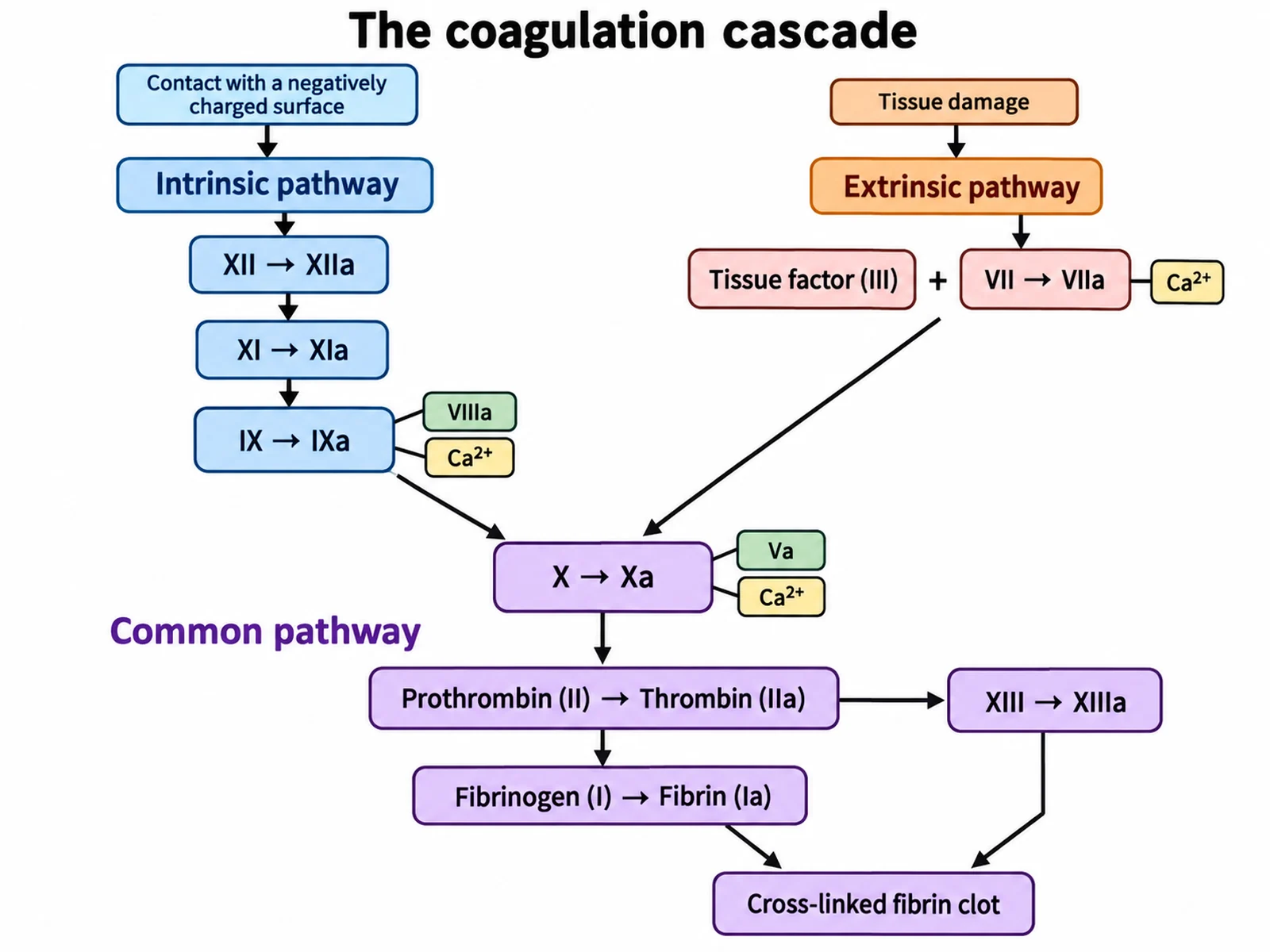
A VSDX file is a drawing saved by Microsoft Visio, the diagramming program used for flowcharts, process maps, network diagrams, floor plans and organisation charts. It has been Visio's standard file format since Visio 2013. Under the hood it is a ZIP archive of XML files, the same kind of package as a Word .docx or PowerPoint .pptx, which is why programs other than Visio can open it.
You do not need a Visio licence to look at one. This guide explains what is inside a VSDX file and how it differs from the older VSD format, then covers every practical way to open, edit and convert one, free options included, and how to get your own figures out as editable VSDX files that colleagues can change in Visio.
VSDX, VSD and the other Visio file types
Visio 2013 introduced a new family of file formats that replaced both the old binary format and the old XML format. Microsoft's developer documentation lists six extensions:
| Extension | What it is | Can contain macros? |
|---|---|---|
| .vsdx | Visio drawing | No |
| .vsdm | Visio macro-enabled drawing | Yes |
| .vssx | Visio stencil (a library of shapes) | No |
| .vssm | Macro-enabled stencil | Yes |
| .vstx | Visio template (a starting drawing with its stencils) | No |
| .vstm | Macro-enabled template | Yes |
Files from earlier versions use the older extensions:
| Older extension | What it is | Used by |
|---|---|---|
| .vsd | Binary Visio drawing | Visio 2010 and earlier (Visio 2013 and later still open it) |
| .vss, .vst | Binary stencil and template | Visio 2010 and earlier |
| .vdx, .vsx, .vtx | XML drawing, stencil and template | Visio 2010 and earlier |
VSD vs VSDX in one sentence: a VSD is a closed binary file that only Visio and a few converters understand, while a VSDX is an open, documented XML package that many programs can read and write. If you have a VSD, open it in Visio and use Save As to get a VSDX; some tools covered below read VSD directly.
Because a .vsdx cannot store VBA macros (only the "m" variants can), a VSDX drawing is a safer file to receive by email than a .vsdm.
What is inside a VSDX file
Microsoft's own description is that a VSDX file "is really a ZIP container that contains other types of files". You can check this yourself: copy a .vsdx, rename the copy to .zip, and open it like a folder. The parts are tied together by the Open Packaging Conventions (OPC), the standard behind all modern Office files.
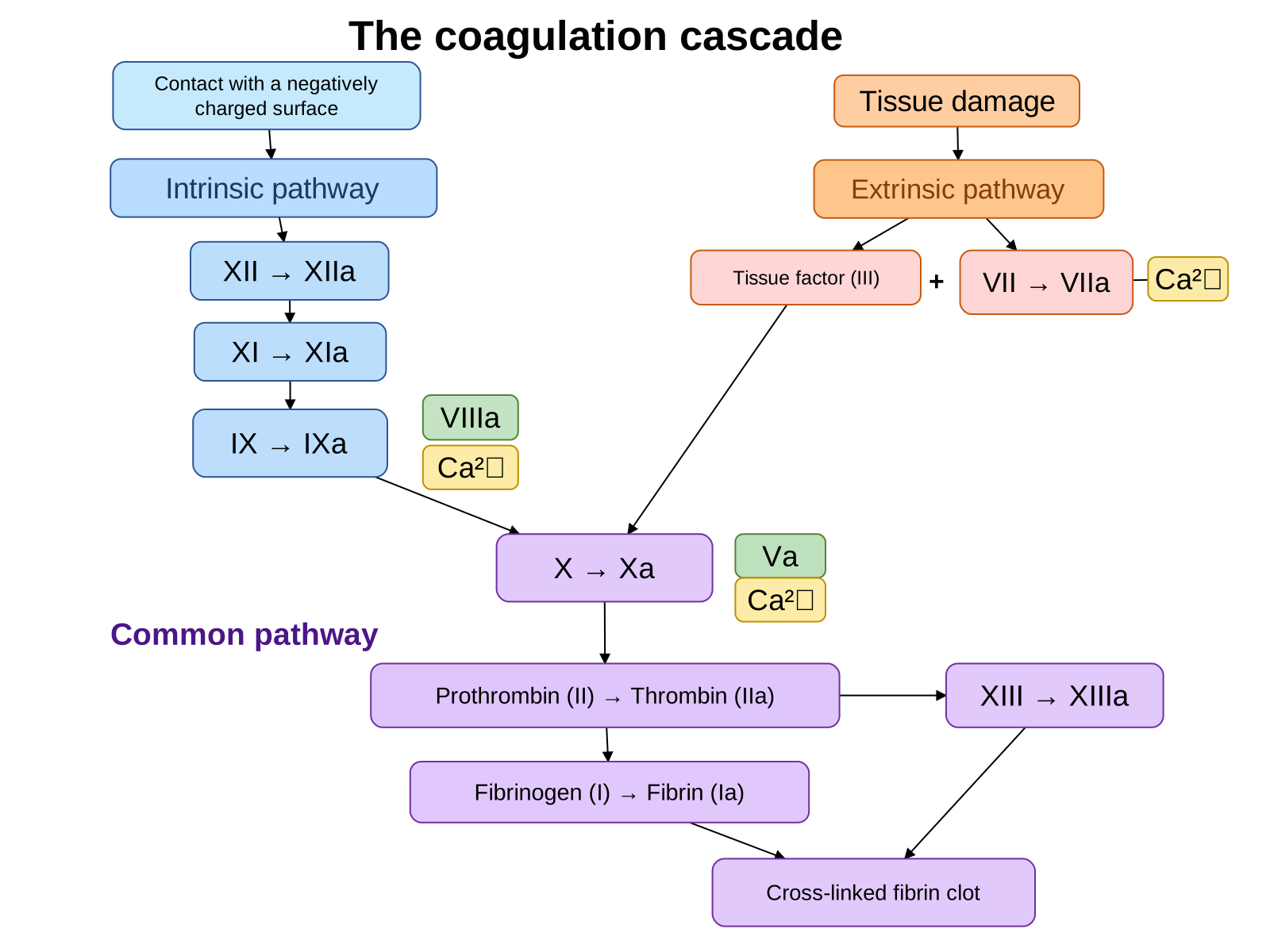
Here is the complete contents of our sample file, coagulation-cascade-editable.vsdx, a one-page flowchart of the blood clotting cascade exported by SciFigure:
| Part | What it holds |
|---|---|
[Content_Types].xml | The type of every part in the package |
_rels/.rels | Where the main document and its properties are |
docProps/core.xml, docProps/app.xml | Title, author and application properties |
visio/document.xml | Document settings, the font list and default styles |
visio/_rels/document.xml.rels | Links from the document to its pages and windows |
visio/pages/pages.xml | The list of pages and each page's size (here 11 × 8.25 in) |
visio/pages/_rels/pages.xml.rels | Links from the page list to each page |
visio/pages/page1.xml | Every shape, connector and text box on page 1, and which connector is glued to which shape |
visio/windows.xml | How Visio's window was arranged |
A drawing saved by Visio itself usually contains more parts, such as visio/masters/ for the stencil shapes it used, a theme, and embedded images. Inside page1.xml, each shape is a list of named cells, the same cells you see in Visio's ShapeSheet. Trimmed, the first box of the flowchart looks like this:
<Shape ID="1" NameU="Rounded rectangle.1" Type="Shape">
  <Cell N="PinX" V="2.31"/>          <!-- centre, inches from the left edge -->
  <Cell N="PinY" V="7.420875"/>      <!-- centre, inches from the bottom edge -->
  <Cell N="Width" V="2.662"/>
  <Cell N="Height" V="0.58575"/>
  <Cell N="LineColor" V="#2F5496"/>
  <Cell N="FillForegnd" V="#C6EAFD"/>
  <Text>Contact with a negatively charged surface</Text>
</Shape>
and the arrows are tied to the boxes by Connect records at the end of the page (also trimmed):
<Connect FromSheet="20" FromCell="BeginX" ToSheet="1" ToCell="PinX"/>
<Connect FromSheet="20" FromCell="EndX"   ToSheet="2" ToCell="PinX"/>
Those two lines say that connector 20 starts on box 1 and ends on box 2. That glue is the practical difference between a real Visio diagram and a picture of one: drag box 2 in Visio and the arrow follows it.
How to open a VSDX file
| Option | Cost | Runs on | Opens .vsdx | Saves back to .vsdx | Good to know |
|---|---|---|---|---|---|
| Visio desktop app (Visio Plan 2, or Visio Standard/Professional 2013 or later) | Paid | Windows | Yes | Yes | The reference: everything in the file is shown and editable |
| Visio for the web (Visio in Microsoft 365, Visio Plan 1 or 2) | Included in many business, enterprise and education Microsoft 365 plans | Any browser | Yes | Yes | Not included in Microsoft 365 Family or Personal; cannot open .vsd; some complex diagram types are not supported |
| draw.io (diagrams.net) | Free | Browser, Windows, macOS, Linux | Yes (import) | Yes (export) | Also imports .vsd and .vssx stencils, but not the 2003–2010 XML formats |
| LibreOffice Draw | Free, open source | Windows, macOS, Linux | Yes | No | Also opens .vsd and .vdx; save as ODG or export to PDF, SVG or PNG |
Visio for the web. If your university or company uses Microsoft 365, sign in to Microsoft 365 and open the file from OneDrive or SharePoint; it opens in the browser. The lightweight Visio included with Microsoft 365 commercial plans can open and edit .vsdx files for the diagram types it supports, but not .vsd files, and Microsoft states that it is not part of the Microsoft 365 Family or Personal plans.
draw.io. Open draw.io in a browser, then use File > Import from > Device and choose the .vsdx file, or drag the file onto the canvas. Multi-page drawings come in as multiple pages. Shapes that use Visio-specific features can look slightly different after import, so compare against a PDF of the original if the layout matters.
LibreOffice Draw. Use File > Open and pick the .vsdx; Draw reads it through its built-in Visio import filter. You can edit the result, but Draw cannot save back to a Visio format, so keep the original if the file must return to a Visio user.
On a Mac. There is no Visio desktop app for macOS. Use Visio for the web if your organisation's plan includes it, or draw.io or LibreOffice, which both run natively on macOS.
How to convert a VSDX file to PDF, SVG or PNG
| From | To PDF | To SVG or PNG |
|---|---|---|
| Visio desktop | File > Export > Create PDF/XPS | File > Save As, then choose SVG or PNG as the file type |
| draw.io | File > Export as > PDF | File > Export as > SVG or PNG |
| LibreOffice Draw | File > Export as > Export as PDF | File > Export, then choose SVG or PNG |
LibreOffice can also convert files in bulk from the command line without opening a window, which is useful for a folder of old diagrams:
soffice --headless --convert-to pdf diagram.vsdx
soffice --headless --convert-to svg diagram.vsdx
PDF keeps every page; an SVG or PNG export gives you a single page, so export a multi-page drawing one page at a time. Which format to pick depends on where the diagram is going:
- PDF for sharing and review: it looks the same everywhere and keeps text sharp at any zoom.
- SVG for further editing in Illustrator, Inkscape or Figma, or for a web page: every line and label stays a separate, scalable object.
- PNG for slides, documents and journal submissions that want a raster image. Export at a high resolution; most journals ask for at least 300 dpi at final size (our journal figure requirements page lists the rules by journal).
How to convert to VSDX
- From VSD: open the .vsd in Visio and choose File > Save As > Visio Drawing (.vsdx). Without Visio, import the .vsd into draw.io and export it as VSDX.
- From a draw.io diagram: File > Export as > VSDX.
- From a PNG or JPG: there is no direct conversion, because a picture has no shapes or connectors in it, only pixels. The diagram has to be rebuilt as shapes, by hand or with a tool that recognises the boxes and arrows (next section).
Why VSDX matters for scientific figures
Most scientific figures end up as PDF, TIFF or PNG, so VSDX is rarely the final format. It matters earlier, when other people need to edit the figure. Hospital and university teams often keep standard operating procedures, sample-processing workflows, study flow diagrams and lab safety flowcharts in Visio, and a collaborator who works in Visio can change a VSDX in minutes but can only redraw a PNG. Delivering the editable file saves a round of "can you just move this box".
Export editable VSDX files from SciFigure
SciFigure can turn a generated flowchart-style figure into a real Visio drawing. After you generate a diagram, choose Convert to editable files on the figure and pick Rebuild as a flowchart. The converter recognises the boxes (rectangles, rounded rectangles, ellipses, diamonds, parallelograms, cylinders and hexagons), the connectors (solid or dashed, with their arrowheads) and the text, lets you check and correct the recognised text, and then gives you three files:
- VSDX for Visio and draw.io, with every box a native Visio shape, every arrow a connector glued to its boxes, and every label editable text;
- PPTX for PowerPoint, Keynote or WPS, with every label a text box;
- SVG for Illustrator, Inkscape or Figma.
The conversion is a paid action that uses credits, shown before you confirm, and the credits are returned automatically if a conversion fails. It suits figures made of boxes and arrows: flowcharts, PRISMA flow diagrams, experimental workflows, pipelines and roadmaps. Illustrations with shading and organic shapes, such as a cell or an organ, stay pictures; for those, the "Editable text" option makes every label editable while the drawing stays as it is.
To see the result before you generate anything, download the sample files from the coagulation cascade on our homepage: VSDX, PPTX and SVG. The VSDX contains 19 boxes, 15 connectors glued at both ends, and 3 free text labels on a single 11-inch-wide page; open it in Visio or draw.io and drag any box to watch its arrows follow. For editing layers, labels and callouts on an existing figure, see editable export.
Frequently asked questions
What is a VSDX file?
A Microsoft Visio drawing in the format Visio has used by default since Visio 2013. It is a ZIP package of XML files that describe each page, shape, connector and piece of text.
What is the difference between VSD and VSDX?
VSD is the older binary format used by Visio 2010 and earlier. VSDX replaced it in Visio 2013 and is based on open XML, so more programs can read and write it. Visio opens both and can save a VSD as a VSDX.
How can I open a VSDX file without Visio?
Use draw.io (free, in the browser or as a desktop app) or LibreOffice Draw (free, open source). If your organisation has a Microsoft 365 business, enterprise or education plan, you can also open it in Visio for the web.
Can I open a VSDX file on a Mac?
Yes, but not in a Visio desktop app, because Visio is not available for macOS. Use Visio for the web through a browser if your plan includes it, or draw.io or LibreOffice Draw, both of which run on macOS.
Can I open a VSDX file in PowerPoint or Word?
PowerPoint and Word cannot open a .vsdx file themselves. Convert the drawing to PDF, SVG or PNG and insert that (Microsoft 365 versions of both accept SVG), or export an editable PPTX if your source tool offers one, as SciFigure's flowchart rebuild does.
How do I convert a VSDX file to PDF for free?
Open it in draw.io and use File > Export as > PDF, or open it in LibreOffice Draw and use File > Export as > Export as PDF. LibreOffice can also convert from the command line with soffice --headless --convert-to pdf file.vsdx.
Can Google Drive or Google Docs open VSDX files?
Not for editing. Google Drive can store .vsdx files, but Google Docs, Sheets and Slides cannot open them. Download the file and open it in draw.io or LibreOffice Draw instead.
Are VSDX files safe to open?
A .vsdx file cannot contain VBA macros; only the macro-enabled .vsdm, .vssm and .vstm formats can. As with any attachment, open files only from people you trust.
How do I turn a flowchart image into an editable VSDX?
A PNG or JPG contains only pixels, so it cannot be converted directly. Either redraw it in Visio or draw.io, or use a tool that rebuilds the boxes, connectors and text as shapes, such as SciFigure's "Rebuild as a flowchart", which exports VSDX, PPTX and SVG.
Related guides and tools
- Editable export: edit labels, arrows and callouts on a figure and export SVG or PPTX.
- PRISMA flow diagram and workflow diagram generator: flowchart figures that convert cleanly to VSDX.
- How to make a PRISMA flow diagram: the reporting rules for systematic review flowcharts.
- Journal submission figure checklist: formats, resolution and fonts before you submit.
Sources
- Microsoft Learn, Introduction to the Visio file format (.vsdx): the six Visio 2013 extensions, macros, OPC packaging and the Cell, Row and Section elements.
- Microsoft Support, About Visio in Microsoft 365: which plans include Visio for the web, .vsd support and limits.
- draw.io, Import formats and sources: .vsdx, .vsd and .vssx import, and the .vdx and .vsx limitation.
- draw.io, Training exercise 10: export and import: File > Export as, including VSDX.
- The Document Foundation, libvisio: the Visio import library used by LibreOffice.
- Ecma International, ECMA-376 Office Open XML, Part 2: Open Packaging Conventions.